



This article explains how software teams are shifting from one-off prompt engineering to designing AI agent loops. Using Claude Code's /goal and /loop commands alongside the Loop Library skill, engineering teams can turn tasks like test fixing, migrations, and monitoring into bounded, governable automations rather than one-off chat exchanges.
Over the past year, large language models have moved from tools you prompt once for a single reply to agents capable of planning, executing, and verifying work across an entire codebase and toolchain. For engineering teams looking to put that shift to real use, the skill that matters most is no longer writing a clever prompt, it's designing AI agent loops that lets a system work towards a clear outcome with minimal hand-holding.
This distinction sounds subtle, but it changes how teams approach automation entirely. A single prompt gets you one answer. A well-designed loop gets you a finished migration, a green test suite, or a monitored deployment without an engineer re-prompting at every step. This article breaks down what an AI agent loop actually is, how to build one using Claude Code's /goal and /loop commands, and the two rules that keep production loops safe and affordable.
What's the Difference Between Prompt Engineering and Loop Engineering?
Prompt engineering focuses on a single interaction: an engineer writes a well-structured instruction, the model responds, and a human decides what happens next.
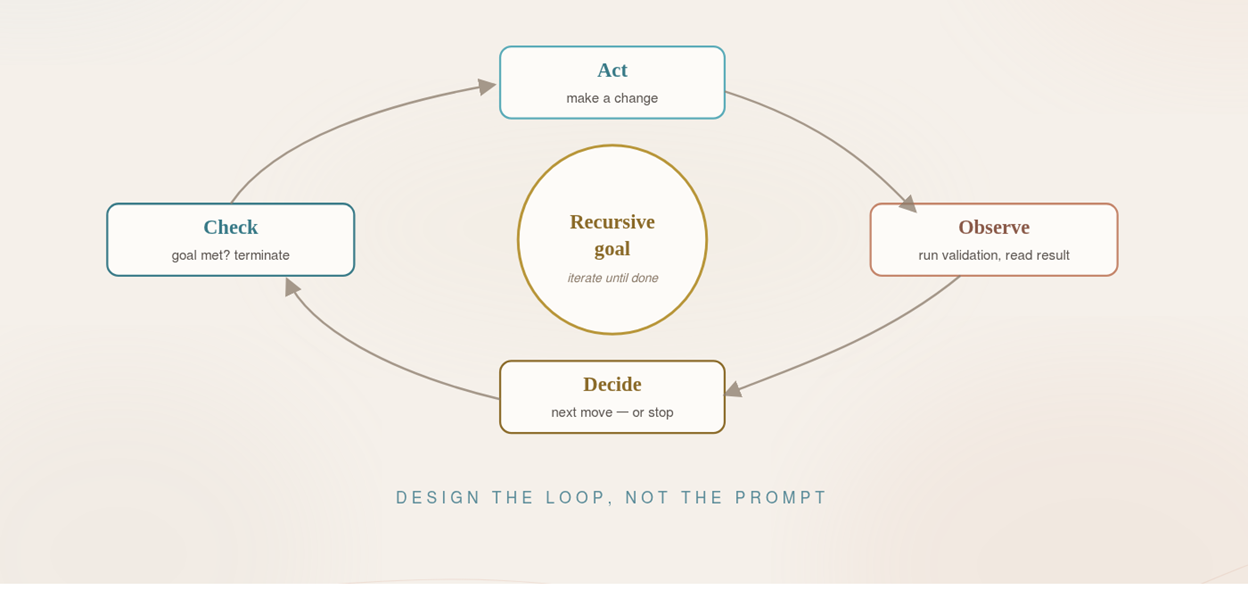
Whereas, Loop engineering treats the model as part of a repeating workflow instead; one that acts, observes the result, adapts, and continues until clearly defined success criteria are met.
For modern engineering teams, this shift matters because most valuable work such as; refactoring, test automation, migrations, and incident analysis, cannot be solved in a single answer. It needs a controlled loop that can verify its own progress.
In practice, those boundaries need to be specific. A well-designed AI agent loop defines its permission scope, sets rules for destructive actions, caps its retries or iterations, works within time and token budgets, and knows when to stop, ask for confirmation, or escalate to a human. These points are further discussed below.
What Is an AI Loop in Practice?
An AI agent loop is a small, goal-oriented workflow where the agent:
- Interprets a clear objective (for example, "all pytest tests pass for chat_service").
- Chooses and executes actions via tools such as the CLI, code editor, APIs, and test runners.
- Measures progress using a concrete metric, such as test status, diff size, coverage, or error rate.
- Decides whether to continue, change approach, or stop, based on that feedback.
Instead of an engineer prompting the model step by step, the loop itself manages the intermediate steps and only escalates when it reaches a boundary condition.
In Claude Code, this can be expressed in two ways.
- Define the outcome with a /goal command, so the agent keeps iterating internally until a measurable finish line is reached.
- Optionally add a scheduled /loop, when you need the same check or workflow to run again over time at a fixed interval.
.png)
Then, if something needs to be checked repeatedly over time rather than solved once, use /loop to run that check on a fixed interval.
.png)
The /goal command tells the agent what success looks like and where it is allowed to act, while /loop gives it a time-based pattern to keep checking and react once the system reaches the desired state.
How Do You Set Boundaries for an AI Loop?
Every production-ready loop needs boundaries as clear as its goal. At minimum, that means:
- A defined permission scope which files, directories, or services the agent is allowed to touch.
- Explicit rules for destructive actions, such as requiring confirmation before creating or deleting a file.
- A cap on retries or iterations, so a stuck loop doesn't run indefinitely.
- A time or token budget, so cost stays predictable.
- A clear escalation point - when the agent should stop, ask for confirmation, or hand the problem to a human.
Written well, these boundaries turn an open-ended automation into something a team can trust, audit, and hand off between engineers.
From Single Loops to Reusable Loop Patterns
Once a team has defined a few good loops, the next step is making them reusable rather than rewriting them from scratch each time.
This is where the Loop Library skill becomes useful. It helps engineers find existing loops, adapt them to a new context, or design new ones with clearer goals, checks, and stop conditions:
Used well, this gives teams a practical way to standardise recurring agent workflows across engineering, research, evaluation, and operations work. Instead of treating every automation as a fresh prompt, the Loop Library encourages teams to build on reusable, bounded patterns that are easier to verify, govern, and improve over time. This is an approach that sits naturally alongside how extended development teams standardise practices across distributed engineers.
How Do You Run AI Loops Safely in Production?
Once a loop can call tools and act through the CLI, good prompt design is only part of the job. Teams also need to think about where the loop runs and what it costs to keep running over time.
- Isolate it. Treat an agent with shell access like any other powerful automation. Run it in a sandbox, devcontainer, or a fresh Git worktree on its own branch. Never directly on main.
- Mind the cost. Autonomous loops can quietly accumulate token and API spend, especially when they run on a schedule. Clear stop conditions and sensible polling intervals keep them useful without becoming expensive.
Conclusion
The shift from prompt engineering to loop engineering isn't about writing cleverer instructions, it's about designing workflows that verify their own progress and know when to stop. Teams that define clear goals, sensible boundaries, and reusable loop patterns can turn recurring engineering work like test fixing, migrations, and monitoring into governable automations rather than one-off conversations with a model.
At Creative Software, our dedicated development teams work with agentic workflows like this as part of day-to-day delivery for our clients across Scandinavia and Europe. If you'd like to explore how loop engineering could fit into your own delivery process, our Sales Director, Mikael Stattin, is happy to jump on a quick 15-minute call to walk through the practicalities.