.jpg)

In today’s digital sphere, most teams rely on various tools to manage communication, analytics, customer relations, content, and operations. While each tool helps individually, together they create a growing amount of repetitive tasks such as copying data, sending follow-up emails, updating spreadsheets, or moving information between apps.
This growing complexity has made automation essential rather than optional. Automation removes manual work, speeds up processes, eliminates human error, and frees up valuable time for deeper, more strategic tasks.
But the story doesn’t end there. With rapid advancements in AI and AI agents, automation is evolving from simple, rule-based tasks into intelligent, decision-making workflows. Instead of just moving data, systems can now analyze context, understand patterns, and choose the best next action. During this transition is where n8n comes in.
What is n8n?
n8n is a no-code/low-code automation platform that lets you connect apps, automate tasks, and build workflows visually. You simply drag and drop “nodes,” connect them together, and define what each step should do.
Instead of locking users into rigid, closed automation systems, n8n gives a high level of flexibility through:
- Source available transparency
- Self-hosting options
- Hundreds of integrations
- Built-in AI features and agent workflows
- A beginner friendly interface with advanced capabilities for developers
Is it Backend?
While n8n isn’t fully considered a backend framework, it still can function as a lightweight backend allowing users to run logic, call APIs, manage data flows, trigger events using workflows giving more control and customization options than traditional automation tools like Zapier or Make. You can keep your data private, deploy on your own system, extend workflows with custom code, and even build full AI-driven systems using Nodes, APIs, and LLM integrations.
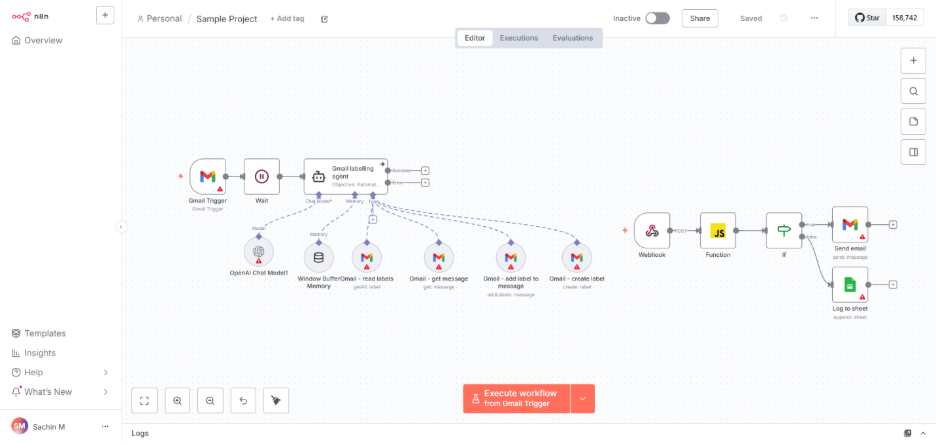
Below shows a sample workflow automation project in n8n:
What Can n8n Do?
n8n can automate tasks across almost any app or service. Popular use cases include:
Classic Automation
- Syncing data between spreadsheets and CRMs
- Posting automated updates to Slack or Discord
- Sending emails or alerts based on triggers
- Automating social media posts
AI Enhanced Automation
With built-in AI integrations, n8n supports:
- Text classification, analysis, and summarization
- Drafting emails, messages, or reports
- Generating content (blogs, captions, posts)
- AI-powered customer support
How Does n8n Work?
n8n uses nodes, each representing a single action (like “send email,” “call API,” or “run AI model”). Nodes are the building blocks of every automation workflow.
You can think of a node as a single step in the process, each one performs a specific task, receives data, processes it, and passes it along to the next step.
Nodes are connected with connections (the lines or “wires” you see in the editor), which define the sequence in which your automation runs. A single node can have multiple connections, allowing workflows to branch, merge, or run in parallel.
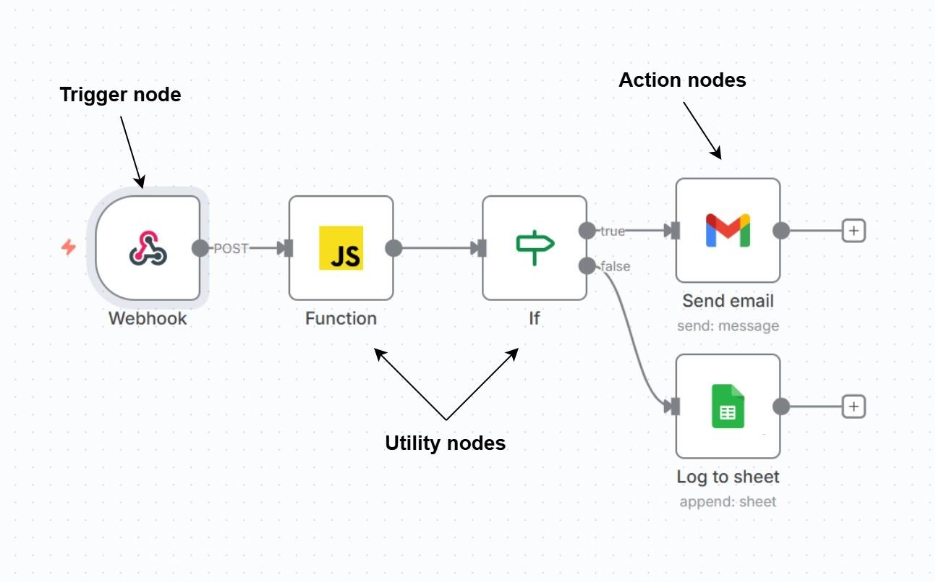
There are three main types of nodes in n8n:
- Trigger Nodes – These start the workflow. eg: Webhook, Gmail trigger.
- Action Nodes – These perform tasks such as sending emails, updating a database, or calling an API. eg: Sending emails, Pushing leads to Zoho CRM.
- Utility Nodes – These manipulate data, run logic, or structure decision-making. eg: IF, Function, Merge, Set.
You link nodes together to form workflows:

Key Features of Nodes:
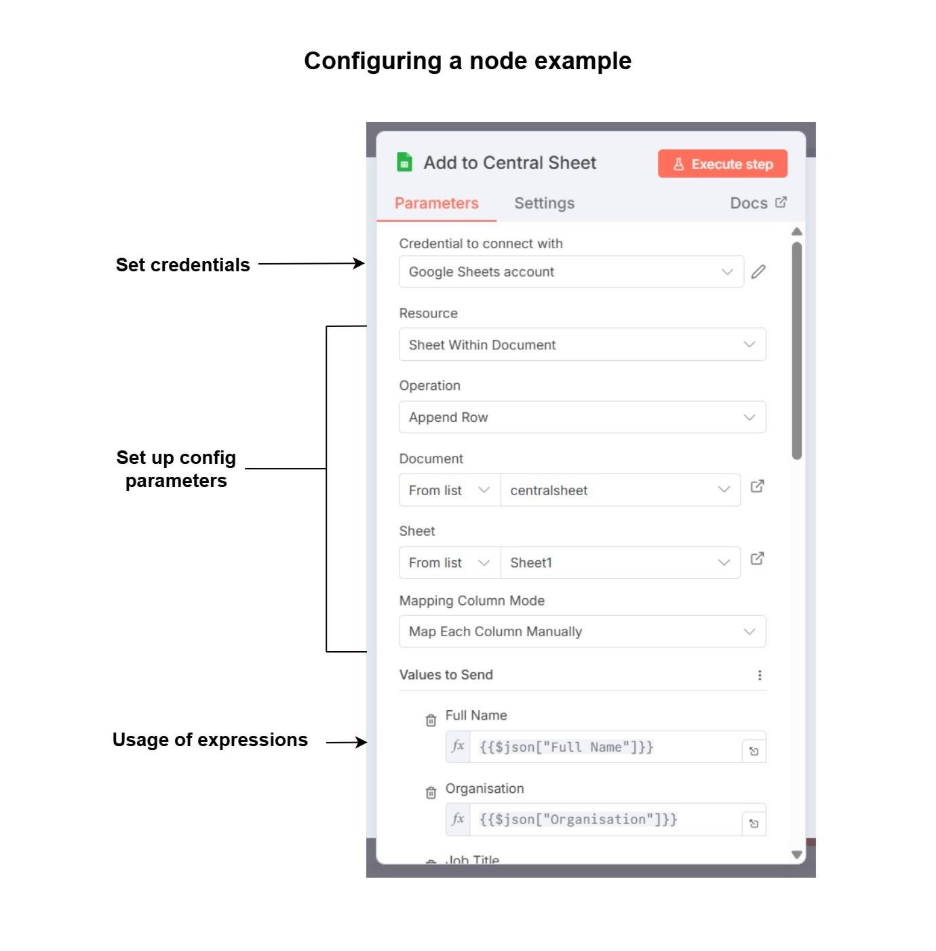
- Configurable parameters for each action
- Can use credentials for authentication eg: Gmail, Slack, Zoho.
- Supports JSON expressions to dynamically use data
Nodes communicate with each other using JSON data, which flows from one node to the next. This makes it easy to reference fields, transform values, or make decisions based on incoming data.
Below is a simple workflow example with the use of different types of nodes:
Getting Started With n8n (Brief Guide)
Getting started with n8n is simple and fast, whether you're a beginner or a developer. Here are some commonly recommended options:
- Using n8n Cloud. – You can go to the n8n website and signup for the cloud version. From there you can open the visual editor and create your workflow. Additionally, you can also browse existing templates to get started.
- Self-Host n8n by running it locally using Docker (recommended).
You can setup n8n using Docker:
Basic Docker command:
docker run -it --rm \
-p 5678:5678 \
-v ~/.n8n:/home/node/.n8n \
n8nio/n8n
Once running, open your browser and visit: http://localhost:5678 From there, you can start building workflows instantly.
Below image shows how a Google Sheet node is configured:
Benefits of using n8n
- Free to self-host: You can run n8n locally on your own server for free. This gives you full control over your data and environment.
- Strong AI and automation capabilities: n8n supports AI models, LLMs, vector databases, and agent-style workflows allowing you to build smart automations or even full AI pipelines.
- Flexibility with level of skill: Whether you’re a beginner or a developer with expertise, you can start simple and later add custom code, expressions, or API logic as needed.
- Large community and expanding ecosystem: With hundreds of nodes, active forums, plugins, and tutorials, n8n has a very supportive and growing user base.
- Extensive integrations: Connect to SaaS platforms, databases, APIs, webhooks, local files, AI services, and more with new integrations added regularly.
Limitations in n8n
- Self-hosting requires some technical setup: Running your own server means you need to set up and configure Docker, databases, updates, and security manually.
- Advanced workflows need planning: As the workflow gets complex, it may be difficult to manage the entire setup, a proper planning of the architecture is necessary.
- AI integrations rely on external APIs: Typically, the usage of AI and third party API integrations comes with a cost and it can charge you depending on the usage, especially when building AI-heavy workflows.
Conclusion
Automation is no longer an optional consideration. It stays relevant in the fast-moving digital world and the rise of agentic systems. Combined with the power of AI and AI agents, automation becomes more intelligent, adaptive, and capable of handling complex workflows that once required human judgment.
n8n helps to bridge the gap between traditional automation and AI integration.
Whether you're organizing customer data, managing business processes, generating content, or building AI-driven agents, n8n provides the tools to design powerful, scalable workflows with ease.
With both free self-hosted options and flexible cloud plans, anyone from an individual freelancer to an enterprise team can start automating smarter today.