


.png)
In modern application design - efficiency, responsiveness, and reliability are major factors to be considered. As the systems grow in complexity and user expectations rise, it is hard to handle everything synchronously. Handling tasks asynchronously has become essential, especially when building systems that need time-consuming, repetitive, or resource - intensive processes that might not need to happen immediately in the main request.
What kind of work needs to be distributed using task queues?
- Long running tasks (e.g., analyzing bulk data, processing images)
- I/O bound operations that spend most of their time waiting for external systems (e.g., sending emails, uploading/downloading files, calling external APIs)
- CPU bound operations that consume a lot of processing power (e.g., graphics and video processing, mathematical tasks such as matrix operations)
- Scheduled jobs (e.g., sending reminders, database backups)
- Background processing
- Retriable tasks (e.g., handling network connection issues)
- Event driven or workflow-based systems
When handling such tasks that demand scalability, fault tolerance and high availability, having a mechanism that can effectively distribute tasks among application components with abilities like tracking progress and scheduling becomes important.
This is where “Task Queues” comes in. A task is a unit of execution or a unit of work. If we take python for example, a task will be a python function. A task queue is a system that controls tasks that come from the main application (AKA the producer) in a way that can be processed asynchronously by separate worker processes.
Celery is an open-source, distributed task queue system which is python-based but also designed to be language-agnostic.
Key concepts of Celery
In Celery, a task will be communicated as a message through a message broker and gets handled by a worker.
Producer is the main application/service that generates the tasks.
Celery keeps track of the tasks and keeps a group of workers to execute the tasks. It uses an external service as a message broker.
Message broker stores tasks/messages in a queue and acts as a communication hub between the celery app instance in the producer and the celery worker.
Each queue exists within the broker. The tasks stay in the queue until a worker sends the acknowledgement. Once the ACK/NACK is sent from the worker, the task will be removed from the broker. We can use Rabbitmq, Redis as brokers and find more here.
There is one main queue with the default name ‘celery’, but we can specify custom queues as well. Even though the tasks in queue will be fetched from the workers as a FIFO, the execution time can differ.
It’s possible to set a prefetch limit to ensure the workers will not get overloaded with the tasks. This is the limit for the number of tasks a worker can reserve for itself. By default, a worker will have this set to 4.
A worker is a daemon process that connects and keeps pulling the tasks from the queue. In Celery, a main worker process acts as a supervisor, spawning multiple child processes or threads to handle tasks concurrently or in parallel, depending on the pool type. The group of child processes or threads is called an execution pool or a thread pool.
The completed task results are stored in the result backend as key-value pairs, where each task ID maps to its corresponding result. For storing task results, Celery can use the message broker itself, a database, or other backends such as IronCache or Elasticsearch. The result store is useful to return data such as the result of a task, the status (eg: success, pending or failure), any exceptions that occurred during its execution, retries, queue and worker related details.
High level architecture
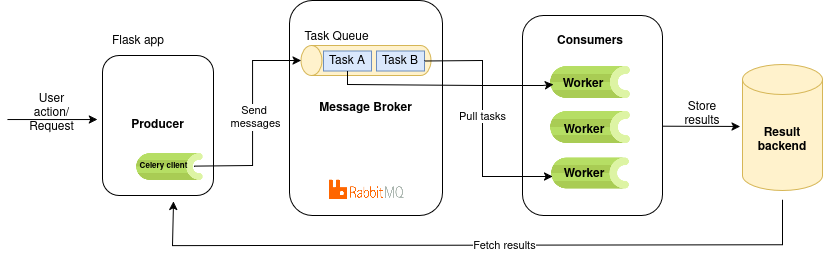
Let’s consider a scenario where an application needs to perform time-consuming operations. We will take an example workflow that will include performing heavy matrix multiplication which is CPU bound and go through how it implements basic features of a Celery task queue system. This demo illustrates the fundamentals of Celery, while real-world task handling scenarios are outside its scope.
How it works:
- The main application receives a request to multiply large matrices
- Instead of blocking the web server the request will be sent to Celery as a background task
- Celery workers, running in separate processes, pick up the task and perform the computation (e.g., multiplying two randomly generated matrices of a given size).
- We can use the Celery chord feature to allow multiple matrix multiplications to be running in parallel.
- The results (such as computation time and matrix size) are stored in a result backend (e.g., Redis), and can be retrieved asynchronously via a status endpoint
This way it offloads the heavy computation from the main application and keeps it responsive to the user. Parallel processing of many tasks, keeping track and gathering results while execution of the other tasks can be achieved this way.
For the demo, Celery will run with a Flask app, using RabbitMQ as the broker and Redis as the result backend for handling chords.
Note: The “rpc”(Remote procedure call - style result backend) result backend does not support chords, if you need to achieve orchestration (advanced features provided by Celery) within your application you need to have a result backend that supports chords: Redis, Database, Memcached etc.
It's best that these services run in separate containers from the main application (flask app) for better resource management and independent scaling.
Using Docker, we shall run the flask app (the producer), RabbitMQ, Redis and the celery worker process as separate services.
Our docker-compose.yml will have the following configurations with the standard ports and commands:
rabbitmq:
 image: rabbitmq:3-management
 container_name: rabbitmq
 ports:
   - "5672:5672"       # broker port
   - "15672:15672"     # management UI


redis:
 image: redis:7
 container_name: redis
 ports:
   - "6379:6379"


flask-app:
 container_name: flask-app
 command: python app.py
 ports:
   - "5000:5000"


celery-worker:
 container_name: celery-worker
 command: celery -A tasks worker --loglevel=info
Command to get Celery worker up and running
$ celery -A tasks worker --loglevel=INFO
celery → Celery command-line entry point
-A / --app → specifies the Celery application instance
tasks → a Python module (file tasks.py) where your Celery app is defined, The module you import the celery app from
worker → argument to start a worker instance
-- loglevel=info → sets the logging level of the worker Celery command entrypoint
as mentioned in the Celery command line interface reference.
In the flask app, let us create a Celery instance giving the message broker URL and the backend descriptor. In celery_config.py:
from celery import Celery


# pyamqp://<user>:<password>@localhost// - if you are running everything locally on your machine
CELERY_BROKER_URL = "pyamqp://admin:mypass@rabbitmq:5672//" # RabbitMQ host port
CELERY_RESULT_BACKEND = "redis://localhost:6379/0" #can use rpc:// for rabbitmq result backend


# Create Celery instance
celery = Celery(
   "tasks",
   broker=CELERY_BROKER_URL,
   backend=CELERY_RESULT_BACKEND,
   include=["tasks"])
We shall define Python functions corresponding to the different tasks in a separate task.py file. For each function, we have to add the @celery.task decorator to make it a Celery task.
This tells Celery that the function can be executed asynchronously by a worker, outside of the main application process. Essentially, it converts a regular function into a unit of work that can be queued, scheduled, or executed in parallel.
A Celery task has its own attributes such as name, request, status, retries etc.
E.g.: @celery.task(bind=True, max_retries=3 )
from celery_config import celery
from celery import chain, chord
import numpy as np
import time
import json


@celery.task
def matrix_multiply_task(size):
   print(f"Starting matrix multiplication for size {size}x{size}")
   start = time.time()
   time.sleep(10)
   # Generate two random matrices
   A = np.random.rand(size, size)
   B = np.random.rand(size, size)
   # Perform multiplication
   result = np.dot(A, B)
   duration = time.time() - start
   print(f"Matrix multiplication complete for size {size}x{size} in {duration:.2f} seconds")
   return {
       "size": size,
       "duration": duration,
       "result_shape": list(result.shape)
   }


@celery.task
def log_matrix_summary(results):
   if isinstance(results, dict):
   	results = [results]
   print(f"Summary for {len(results)} matrix multiplications:")
   summary = []
   for res in results:
       # Only try to parse JSON if the string looks like JSON
       if isinstance(res, str) and res.strip() and res.strip()[0] in '{[':
           try:
               res = json.loads(res)
           except Exception as e:
               print(f"Could not parse result: {res} because of {e}")
               continue
       # Only process dicts with expected keys
       if isinstance(res, dict) and 'size' in res and 'duration' in res and 'result_shape' in res:
           print(f"  Size: {res['size']}x{res['size']}, Duration: {res['duration']:.2f}s, Shape: {res['result_shape']}")
           summary.append({
               "size": res['size'],
               "duration": res['duration'],
               "result_shape": res['result_shape']
           })
   return {"count": len(summary), "summary": summary}


# Single workflow (unchanged)
def run_matrix_multiplication_workflow(size):
   workflow = chain(
       matrix_multiply_task.s(size),
       log_matrix_summary.s()
   )()
   return {"task_id": workflow.id, "status": "STARTED"}


# Chord workflow for bulk matrix multiplication
def run_matrix_multiplication_chord_workflow(sizes):
   header = [matrix_multiply_task.s(size) for size in sizes]
   callback = log_matrix_summary.s()
   workflow = chord(header)(callback)
   return {"task_id": workflow.id, "status": "STARTED"}
In the main application, we simply send the /matrix-multiply or /matrix-multiply-bulk POST request which will be the entrypoint but without affecting the main request. Celery tasks will run in the background after being sent through the broker to the workers. Then we can asynchronously track the task status using GET/task-status. Celery allows us to retrieve details such as the current state of the task, result, any traceback if an exception occurs, and retry information—enabling efficient monitoring and handling of multiple tasks in the background.
from flask import Flask, jsonify, request


from celery_config import celery
from tasks import run_matrix_multiplication_workflow, run_matrix_multiplication_chord_workflow


app = Flask(__name__)


@app.route("/task-status/<task_id>")
def task_status(task_id):
   res = celery.AsyncResult(task_id)
   return jsonify({
       "task_id": res.id,
       "status": res.status,
       "result": res.result  # Will be null unless a result backend is configured
   })


@app.route("/matrix-multiply", methods=["POST"])
def matrix_multiply():
   data = request.json
   size = data.get("size", 0)
   result = run_matrix_multiplication_workflow(size)
   return jsonify(result)


@app.route("/matrix-multiply-bulk", methods=["POST"])
def matrix_multiply_bulk():
   data = request.json
   sizes = data.get("sizes", [0,0,0])
   result = run_matrix_multiplication_chord_workflow(sizes)
   return jsonify(result)
Monitoring tools
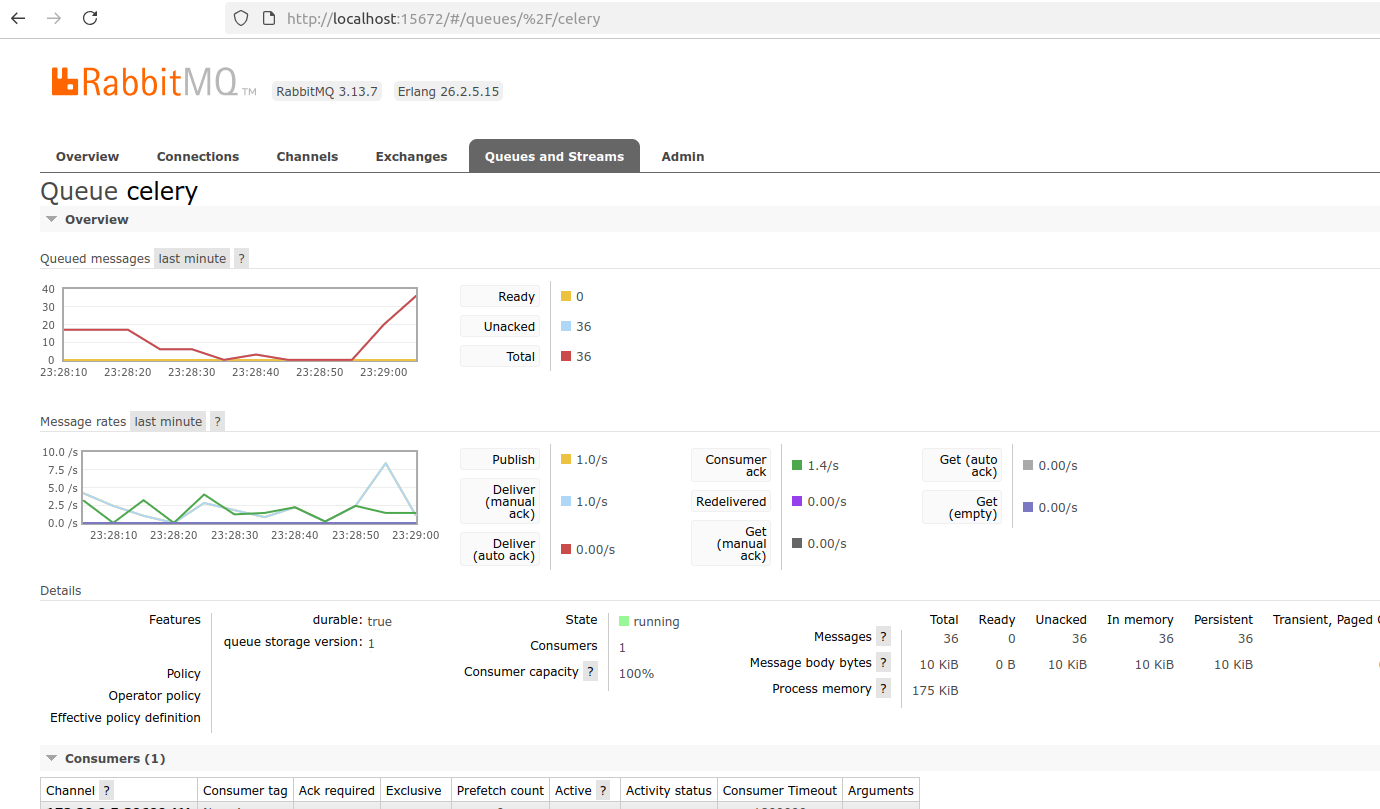
We can use the RabbitMQ Management UI to monitor queues, messages and worker activity in real time.
Celery task queues can also integrate with Prometheus and Grafana for advanced metrics and visualization dashboards.
More features of Celery
Celery supports JSON by default and other serialization schemes (e.g. pickle) for task messages.
To achieve scheduled tasks, Celery tasks with ETA (Estimated Time of Arrival) are used. These tasks will be going to the "Unacked" queue instead of the main queue and will be available to the workers for execution when the time arrives.
Note: It is not recommended to be used for longer intervals. Ideally, use values no longer than several minutes. For longer durations, consider using database-backed periodic tasks (i.e., hours, days)
Celery’s retrying mechanism is mostly used to re-exectue a task when it fails and is supported when explicitly configured. A good use case of this feature would be handling negative responses returned by an external API, with temporary failure reasons.
The time between the retries, maximum retry attempts before the task fails can be set for a task.
The acknowledgement of a task can be set after completing task execution or before execution. Safest way and the default setting is to set acknowledgement before execution. But to ensure the tasks are executed at least once, it can be customized as well.
To improve performance with high availability, a celery system can be scaled with multiple workers and brokers.
Celery beat, which is a scheduler, can be used to schedule periodic tasks. While normal Celery tasks are triggered manually or by the app, Beat automatically sends tasks to the queue based on a defined schedule. Celery workers will then pick up and execute the tasks.
Advanced features
- Task chaining - Executes tasks sequentially: output of one task becomes input of the next. This allows us to define workflows. If a task fails, the chain stops unless you handle retries or errors manually.
- Task Groups - Executes multiple tasks in parallel and manages the collective results. Depending on the configuration and resources available, tasks within a group is designed to run in parallel potentially across multiple worker processes or even different worker nodes
- Chords - Links many groups together. A Chord is only executed after all the tasks in a group have been executed completely. Workflow orchestration is achieved.
- Rate Limiting - Apply time and rate limits to control how frequently tasks are executed.
- AsyncIO Support - Celery does not natively support running async Python functions as tasks. For I/O-bound workflows, wrap async functions in synchronous tasks.
Celery also provides extensive monitoring tools, robust retry strategies to handle temporary service interruptions, and many other advanced features as you explore it further.
Apart from Celery – RQ, Sidekiq etc. are used as queuing technologies. Celery is a full-featured Python task queue ideal for complex apps, RQ is a lightweight Python queue suited for small projects or demos, and Sidekiq is a fast, reliable Redis-based queue for Ruby applications.
Benefits of using Celery
- Scalability and reliability - Celery is used by major companies across the world and has demonstrated proven reliability and scalability in production environments. Allows for easy horizontal scaling by adding more workers to handle increased task load. With features like retrying failed tasks and ensuring task delivery even in case of worker or broker failures ensure its reliability.
- Asynchronous Processing: Offloads time-consuming tasks from the main application thread, improving responsiveness and user experience.
- Scheduling: Built in scheduling allows scheduling tasks to run at specific times or intervals without needing external services.
- Rich workflow orchestration - Supports mechanisms to define complex task dependencies. When the tasks need to follow a specific sequence Celery chains allow linking tasks together in a linear order. They run one after the other and pass data from one task to the other.
- Flexible broker and backend support - Celery supports several message transport alternatives and flexibility to integrate with different types of result backends.
Limitations of using Celery
- Potential overuse of memory - Misconfigured concurrency or too many workers can overload the system as each Celery worker can spawn multiple child processes or threads consuming the memory.
- Need for careful handling of connection errors - Network and database errors are common in distributed systems. Celery offers fault tolerance, automatic retries, and error handling, but tasks must still be carefully designed with timeouts and idempotency to handle failures gracefully, especially given its reliance on a third-party message broker.
- Complex setup - Celery needs external message brokers and result backend services which adds complexity in setting up.
- Concurrency Pitfalls - With multiple workers processing the same data, it can lead to getting race conditions. These can be prevented using ways such as using db locks, task routing.
Task queues enhance performance, responsiveness, reliability and scalability in complex systems. In today’s evolving tech landscape, new tools and technologies continue to emerge, each offering different ways to handle distributed processing and background task handling. Celery can be challenging to master initially, but its powerful capabilities such as support for complex task orchestration patterns, built-in retries and error handling, advanced scheduling and support for multiple brokers and result backends make it a feature-rich and reliable choice for managing background tasks.
Like any other tool, the use of distributed task queues is most effective when applied where it’s truly needed. Their value depends entirely on the purpose of the system and the specific goals it aims to achieve.