



This article explains how agentic AI sub-agents can automate the journey from feature requirements to Playwright automation by reading backlog items, generating test cases, publishing them to test management platforms, generating Playwright automation scripts, and healing failing tests. The workflow works across Azure DevOps, Jira, Zephyr, Xray, TestRail and similar tools, helping QA teams accelerate delivery while maintaining coverage and traceability.
Modern software development requires faster delivery cycles while maintaining high quality. Traditional manual testing and automation script creation can be time-consuming, especially when large features contain multiple requirements and user stories.
To address this challenge, an AI-driven automation workflow can be introduced using specialised AI sub-agents. These agents work together to transform business requirements into test cases, publish them to a test management platform, generate Playwright automation scripts, and even heal failing tests automatically. For engineering leaders running extended development teams across distributed geographies, this kind of workflow becomes particularly valuable - it removes repetitive effort while keeping human review firmly in the loop.
This article describes a generic end-to-end workflow that can be used with different project management and test management tools such as Azure DevOps Test Plans, Jira with Zephyr, Xray, TestRail, or similar platforms.
How the Agentic AI Test Automation Workflow Works
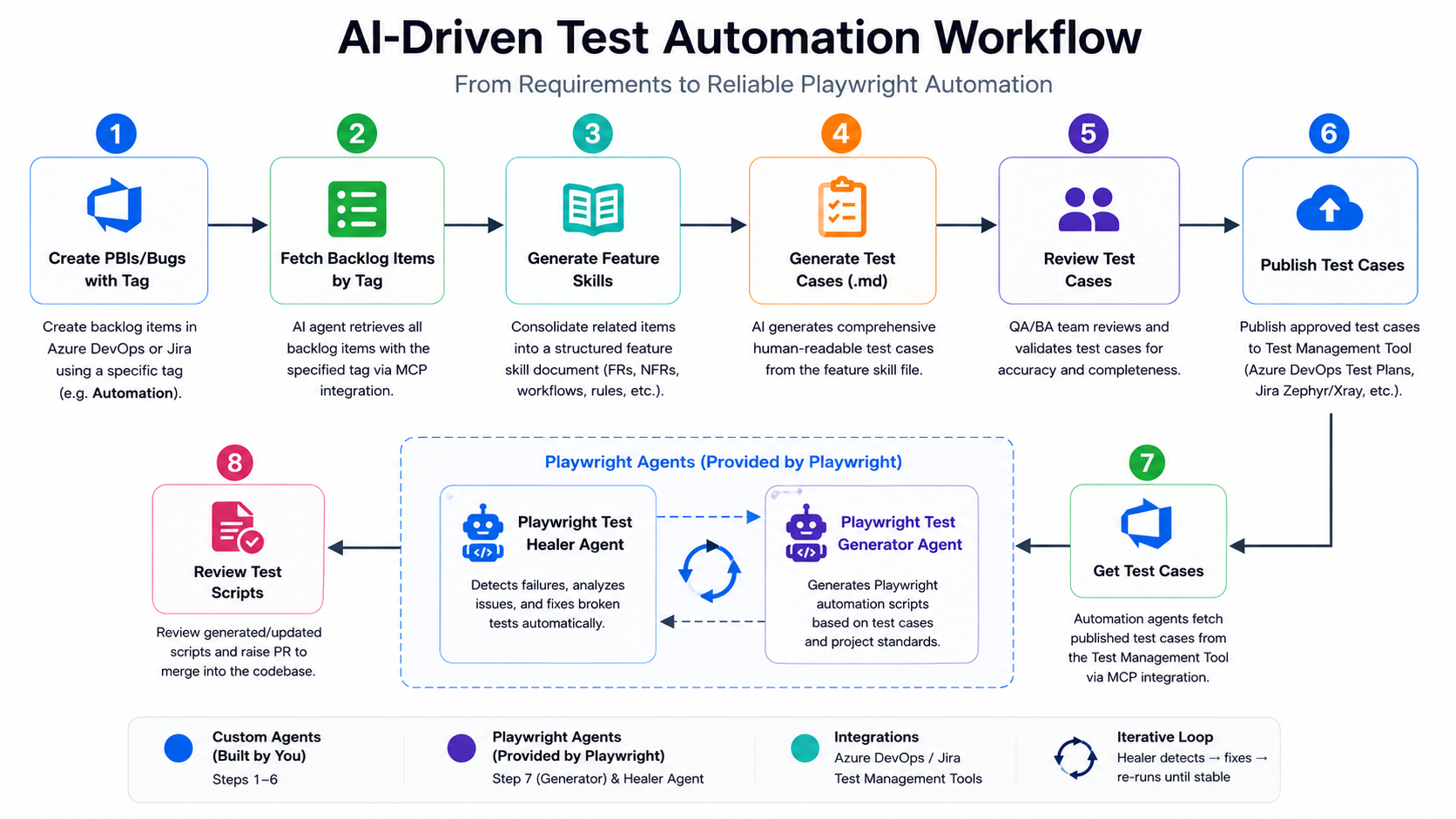
The workflow consists of several AI agents that collaborate throughout the requirements-to-automation workflow
The Create Feature Agent, Test Case Generator Agent, and Publish Test Cases Agent are custom agents developed specifically for this workflow. The Playwright Test Generator, Test Healer, and Test Planner agents are provided by the Playwright Test Agents framework and are responsible for automation generation, planning, and maintenance.
This workflow allows teams to move from requirements to automated tests with minimal manual effort while still maintaining human validation checkpoints.
Step 1: Create and Organise Feature Requirements
Before starting the AI workflow, the feature requirements must be documented in a project management system.
Examples include:
- Azure DevOps
- Jira
- Rally
- ClickUp
- Monday.com
- Any backlog management tool
A feature may contain:
- Epics
- Features
- User Stories
- Product Backlog Items (PBIs)
- Bugs
- Tasks
It is important to ensure that all functional areas of the feature are properly described.
For example, a feature such as Customer Management may contain multiple PBIs covering:
- Customer creation and registration
- Customer profile management
- Search and filtering capabilities
- Role-based access permissions
- Data validation rules
- Notification and communication settings
Each requirement contributes to the overall feature definition. The AI workflow relies on these requirements as the source of truth.
Step 2: Connect AI Agents to Your Project Management System
The first step in the automation process is connecting AI agents to the project management platform using an integration layer such as an MCP (Model Context Protocol) server.
The integration allows AI agents to:
- Read backlog items
- Read user stories
- Read acceptance criteria
- Read feature relationships
- Collect requirement information
The implementation is platform-independent.
Examples:
Azure DevOps
- Connect to Azure DevOps
- Retrieve PBIs using a specific tag
- Read parent Features and Epics
Jira
- Connect to Jira
- Retrieve stories using labels, components, or filters
- Read linked Epics and requirements
The mechanism differs between tools, but the overall process remains the same.
Step 3: Generate Feature Skills with the Create Feature Agent
The Create Feature Agent reads all tagged backlog items and converts them into a structured feature document.
In the implementation described here, a tag such as: Automation was used to identify backlog items that should be processed.
However, any tag, label, component, or filter can be used depending on the project management platform.
The agent performs the following tasks:
- Retrieves all tagged backlog items.
- Identifies related Features.
- Groups related requirements.
- Creates a consolidated Feature Skill document.
- Produces a feature-focused specification instead of copying individual user stories.
The output becomes a structured feature definition that serves as the foundation for test generation.
What Does a Feature Skill Contain?
A Feature Skill acts as the single source of truth for a feature. Instead of simply storing backlog items or acceptance criteria, it consolidates requirements into a structured document that can be consumed by downstream AI agents.
A typical Feature Skill may contain:
- Feature overview and business purpose
- Functional requirements (FRs)
- Non-functional requirements (NFRs)
- Scope definition
- In-scope and out-of-scope items
- User workflows and business rules
- Permission and access requirements
- Validation requirements
- Dependencies and implementation notes
By consolidating information into a single structured document, AI agents can generate test cases and automation scripts based on feature-level requirements rather than individual backlog items. This improves consistency and ensures that testing activities align with the overall feature scope rather than isolated user stories.
Step 4: Generate Test Cases from Feature Skills
Once the feature skill has been created, the Test Case Generator Agent analyses the feature requirements and automatically generates detailed test cases.
The generated test cases include:
- Happy path scenarios
- Negative scenarios
- Edge cases
- Validation scenarios
- Business rule verification
- Non-functional requirements where applicable
Each test case contains:
- Test case ID
- Requirement reference
- Preconditions
- Test steps
- Expected results
- Priority
The generated output is intentionally written in a human-readable format so that QA engineers, Product Owners, and Business Analysts can review it easily.
Step 5: Review and Validate AI-Generated Test Cases
Although AI can generate a large percentage of the required test coverage, human review remains an essential part of the process. This is where experienced QA engineers, whether in-house or embedded within an extended development team add the most value.
Before publishing test cases:
- Review all generated scenarios.
- Verify business rules.
- Check missing edge cases.
- Validate acceptance criteria coverage.
- Ensure terminology matches the application.
AI may occasionally:
- Misinterpret requirements.
- Miss complex business logic.
- Create unnecessary test cases.
- Overlook exceptional scenarios.
Therefore, manual review should always be performed before moving to the next step.
Step 6: Publish Test Cases to Your Test Management Platform
After validation, the test cases are published to the test management solution of the organization. The target platform may vary depending on the project.
Azure DevOps Projects
Publish to:
- Azure DevOps Test Plans
Jira Projects
Publish to:
- Zephyr
- Xray
- Other Jira test management plugins
Other Platforms
Publish to:
- TestRail
- qTest
- PractiTest
- Similar test repositories
The Publish Test Cases Agent synchronises the generated test cases with the chosen platform and maintains traceability between requirements and tests.
Step 7: Generate Playwright Automation Scripts Automatically
Once the approved test cases exist in the test management platform, the Playwright Test Generator Agent converts them into executable Playwright automation scripts.
The Playwright Test Generator Agent and Playwright Test Healer Agent are provided by the Playwright Test Agents framework. Before using these agents, they should be configured according to the official Playwright documentation:
https://playwright.dev/docs/test-agents
This documentation explains how to install, configure, and integrate Playwright agents into your existing automation framework and AI-assisted development workflow.
The agent follows established automation standards such as:
- Page Object Model (POM)
- Reusable components
- Existing project architecture
- Centralised test data management
- Authenticated session reuse
The generated automation scripts are:
- Consistent
- Maintainable
- Scalable
- Easy to review
The agent can also generate:
- New Page Objects
- Missing reusable methods
- Test datasets
- Feature-specific automation suites
This significantly accelerates automation development compared to writing scripts manually.
Step 8: Review and Refine the Generated Playwright Scripts
Just as test cases require review, automation scripts should also be validated by automation engineers.
The review typically includes:
- Locator validation
- Test flow verification
- Code quality review
- Assertion improvements
- Naming convention checks
- Framework compliance
After review, the scripts can be committed and submitted through the normal code review process.
Step 9: Heal Failing Playwright Tests with the Test Healer Agent
One of the most powerful aspects of the workflow is the Playwright Test Healer Agent.
Applications evolve over time:
- UI elements change
- Locators change
- Validation messages change
- User flows are updated
These changes often cause automation failures.
The Test Healer Agent analyses failing tests and:
- Executes the failing test.
- Identifies the root cause.
- Investigates locator issues
- Reviews page state.
- Updates automation code.
- Re-runs the test.
- Repeats until the issue is resolved.
This reduces maintenance effort and improves automation stability.
Optional: Generate Comprehensive Test Plans Using a Test Planning Agent
Before generating automation, teams may also use a Test Planning Agent.
The planner explores the application and creates comprehensive test plans covering:
- User journeys
- Happy paths
- Negative paths
- Validation scenarios
- Edge cases
- Error handling
This provides additional assurance that important scenarios are not missed during automation generation.
What Are the Benefits of AI-Driven Test Automation?
Organisations adopting this workflow can achieve several advantages:
- Faster Test Creation - Requirements are transformed into test cases and automation scripts in a fraction of the time required manually.
- Reduced Manual Effort - Many repetitive tasks are automated, allowing QA engineers to focus on exploratory testing and quality improvements.
- Standardised Test Structure -cGenerated test cases and automation scripts follow consistent patterns and conventions.
- Improved Productivity - Teams can cover more functionality with fewer manual activities.
- Better Traceability - Requirements, test cases, and automation scripts remain linked throughout the workflow.
- Scalable Automation - The approach can be applied across multiple projects and teams, making it particularly well-suited to organisations working with distributed or extended engineering teams.
- Easier Maintenance - AI-assisted test healing reduces the cost of maintaining automation suites.
- Support for Multiple Platforms - The same workflow can be applied regardless of whether the organisation uses the tools below:
- Azure DevOps
- Jira + Zephyr
- Jira + Xray
- TestRail
- qTest
- Other equivalent tools
Conclusion: Scaling QA with Agentic AI and Extended Development Teams
AI-powered sub-agents provide a practical way to automate the journey from requirements analysis to automated Playwright script generation and maintenance.
The workflow begins with well-defined backlog items, transforms those requirements into structured feature documentation, generates test cases, publishes them to a test management platform, creates Playwright automation scripts, and continuously maintains those scripts through automated healing.
The result is a faster, more scalable, and more maintainable quality assurance process that can be adapted to virtually any project management and test management ecosystem.
At Creative Software, our QA engineers work with agentic AI workflows like this one every day as part of the extended development teams we build for product companies across Scandinavia and Europe. If you'd like to explore how a similar setup could support your delivery goals, our Sales Director, Mikael Stattin, is happy to jump on a quick 15-minute call to walk you through the practicalities.
Frequently Asked Questions
1. What is agentic AI in software testing?
Agentic AI in software testing refers to AI sub-agents that can reason, plan, and act autonomously across the requirements-to-automation workflow rather than simply generating text on request. Each agent is assigned a specific responsibility such as; leading backlog items, generating test cases, publishing them to a test management platform, creating Playwright scripts, or healing failing tests and the agents collaborate to move work from requirement to executed automation with minimal manual intervention. Human review checkpoints remain in place at key stages to ensure quality and business-rule accuracy.
2. Can this AI-driven test automation workflow be used with Jira and Azure DevOps?
Yes. The workflow is designed to be platform-independent and works with Azure DevOps, Jira, Rally, ClickUp, Monday.com, and most other backlog management tools. Integration is handled through an MCP (Model Context Protocol) server, which allows AI agents to read backlog items, user stories, acceptance criteria, and feature relationships regardless of the underlying platform. Test cases can then be published to Azure DevOps Test Plans, Zephyr, Xray, TestRail, qTest, or any similar test management solution.
3. Does agentic AI replace QA engineers?
No. Agentic AI reduces repetitive work but does not replace the judgement of experienced QA engineers. Human review is essential at two stages — validating AI-generated test cases before publishing, and refining generated Playwright scripts before they enter the codebase. AI can misinterpret business logic, miss edge cases, or generate unnecessary tests, so QA engineers remain responsible for coverage decisions, business-rule verification, and framework compliance. The workflow shifts QA effort away from manual scripting and towards higher-value exploratory testing and quality strategy.
4. How does the Playwright Test Healer Agent reduce maintenance effort?
The Playwright Test Healer Agent automatically investigates and fixes failing automation scripts caused by application changes such as updated locators, revised validation messages, or altered user flows. When a test fails, the agent executes it, identifies the root cause, reviews the current page state, updates the automation code, and re-runs the test until the issue is resolved. This significantly reduces the manual effort required to maintain large automation suites, which is often one of the biggest ongoing costs of test automation at scale.